
How to Choose the Right Paper Roll for Your POS System
Jun 23rd 2025
Width, length, core size, paper type — there are a lot of variables when ordering receipt paper. But once you understand what each measurement means, finding the right roll takes about 30 seconds. Here's the complete step-by-step guide.
Step 1 — Identify Your Printer Type
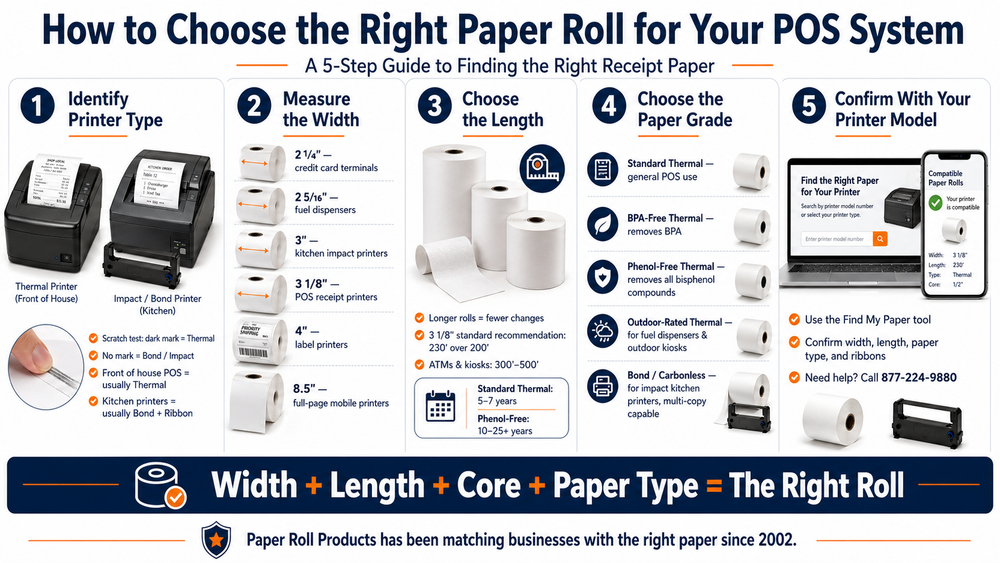
Before anything else, confirm whether your printer is thermal or impact/bond. Use the fingernail test: scratch your current paper firmly. If a dark mark appears, it's thermal. If nothing happens, it's bond. Kitchen printers near heat sources are almost always impact/bond. Front-of-house POS printers are almost always thermal.
Kitchen printers near heat sources require bond paper and an ink ribbon — not thermal. See our full guide on why thermal paper fails in kitchen printers before placing your order.
For a deeper explanation of how each paper type works, see our thermal vs bond receipt paper guide.
Step 2 — Measure the Paper Width
Remove your current roll and measure the width of the paper from edge to edge. This is your width specification. Common widths:
- 2 1/4" — Credit card terminals (Verifone, Ingenico, PAX, Clover Mini, Square Terminal)
- 2 5/16" — Fuel dispensers only (Wayne, Gilbarco, Tokheim, Bennett)
- Fuel dispensers have unique outdoor exposure requirements beyond just size. See our full guide on fuel dispenser receipt paper before ordering pump rolls.
- 3" — Kitchen impact printers (bond paper)
- 3 1/8" — POS receipt printers — the most common size (Epson TM-T88, Star TSP100, Clover Station, Square Register)
- 4" — Label printers (Zebra ZD series)
- 8.5" — Full-page mobile printers (Brother PocketJet — law enforcement)
Need help understanding what each width measurement means? See our receipt paper size guide for a complete breakdown by printer model.
Step 3 — Choose the Length
Longer rolls mean fewer changes. If your printer supports multiple lengths, always choose the longest compatible option. For 3 1/8" printers, 230' is the standard recommendation over 200'. For high-volume kiosks and ATMs, 300'–500' rolls dramatically reduce service frequency.
Step 4 — Choose the Paper Grade
- Standard Thermal — General POS use, 5–7 year image life
- BPA-Free Thermal — Removes bisphenol A, good for most retail environments
- Phenol-Free Thermal — Removes all bisphenol compounds, required for healthcare, recommended for high-touch retail. 10–25+ year image life.
- Not sure whether BPA-Free is enough for your operation? See our full guide on Phenol-Free vs BPA-Free thermal paper.
- Outdoor-Rated Thermal — UV-stable for fuel dispensers and outdoor kiosks
- Bond / Carbonless — For impact kitchen printers, heat-resistant, multi-copy capable
If you're ordering for an ATM, paper grade is only part of the equation — wound direction and core size are equally critical. See our full guide on ATM receipt paper.
Once you've chosen the right grade, proper storage is essential to protecting your investment. See our thermal paper storage guide.
Step 5 — Confirm With Your Printer Model
The fastest way to confirm your exact spec is to use our Find My Paper tool. Enter your printer or terminal model and we'll show you the exact roll it requires — width, length, paper type, and compatible ribbons if needed.
When in Doubt, Call Us
Paper Roll Products has been matching businesses with the right paper since 2002. If you're not sure what you need, call us at 877-224-9880 and we'll confirm your spec in under a minute — no account required. Ready to order? Request a B2B account for volume pricing and same-day shipping.