POS Printer Ribbons
Jun 27th 2026
Not every receipt printer uses a ribbon — but the ones that do will print nothing at all without the right one. Impact printers, the kind that print by striking an inked ribbon against the paper, still run in kitchens, back offices, and check-validation stations everywhere. If you've ever stared at a ribbon part number wondering which one your printer takes, this guide sorts it out.
Thermal vs. Impact: Why Only Some Printers Use Ribbons
Thermal printers create an image with heat — no ink, no ribbon, ever. Impact (dot-matrix) printers have no heat element; they physically strike an ink ribbon against the paper. That's why a kitchen or validation printer needs both a ribbon and the right paper. If you're unsure which type you have, see Thermal vs. Bond Paper — the paper type and the ribbon question go hand in hand.
The Ribbon Is Matched to the Printer, Not the Paper
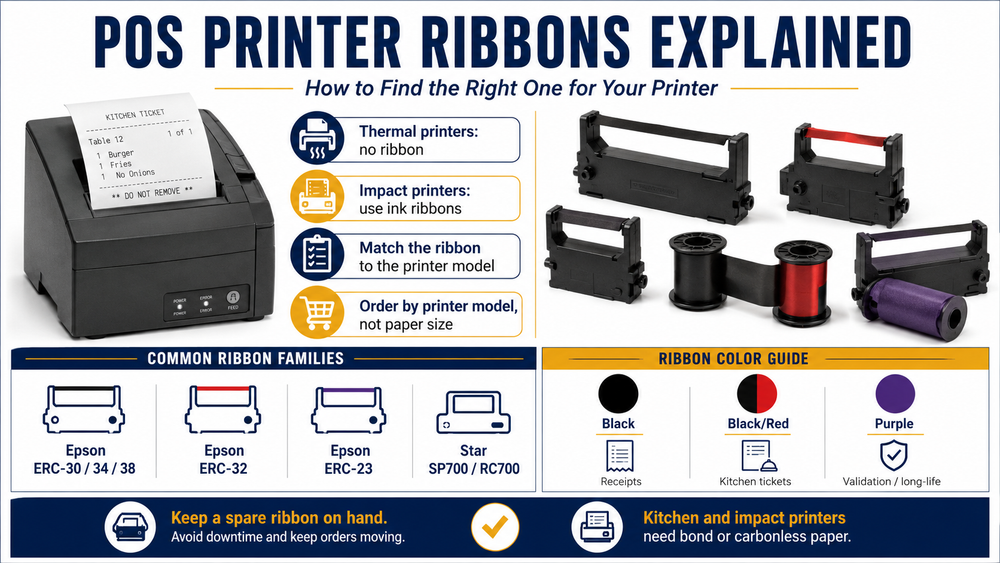
This is the key idea: you order a ribbon by printer model, not by paper size. Two printers using the same 3" bond paper can take completely different ribbons. Find your printer model (it's on the label or in the manual), then match it below.
Common POS Ribbons by Printer
| Ribbon | Fits (common models) | Colors Available |
|---|---|---|
| Epson ERC-30 / 34 / 38 | Epson TM-U220 and many kitchen impact printers (these three ribbons are cross-compatible) | Black, Black/Red |
| Epson ERC-32 | Epson TM-U675, TM-H6000 and similar wider-carriage printers | Black, Purple |
| Epson ERC-23 | Older Epson M-series printers | Black |
| Star SP700 (RC700) | Star SP700 and SP742 kitchen printers | Black, Black/Red |
Always confirm against your printer manual — a handful of models look identical but take different cartridges.
Black vs. Black/Red vs. Purple
The color choice usually comes down to the job:
- Black — the standard for receipts, work orders, and validation.
- Black/Red — the go-to for kitchen tickets. Modifiers, allergens, and priority items print in red so line cooks catch them at a glance.
- Purple — a long-life single color used in some Epson models; it tends to last longer than a black ribbon before fading.
Don't Mix Up Ribbons and Thermal Paper
A common and costly mistake: buying a ribbon for a thermal printer (it doesn't use one) or loading thermal paper in a ribbon printer (it comes out blank). Impact printers need bond or carbonless paper plus a ribbon. See Why Your Kitchen Printer Needs Bond Paper, Not Thermal for the full breakdown.
When to Replace a Ribbon
Ribbons wear gradually rather than failing outright. When print looks faint, patchy, or streaky — but the paper is correct and loaded right — the ribbon is spent. Keep a spare on the shelf so a fading ribbon never stops service mid-shift.
Shop POS Printer Ribbons
Paper Roll Products stocks compatible ribbons for every major impact printer — Epson ERC and Star SP series in black, black/red, and purple. Employee-owned since 2002 and based in Eagan, MN, with same-day shipping on in-stock orders.